
How Can We Help?
How to change your favicon in WordPress: a step-by-step guide
The favicon is called a site icon in WordPress and can be added in the customize theme section.
Once you’ve logged in to the Dashboard
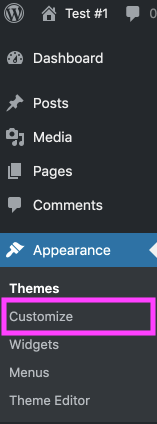
Click on ‘Appearance’
On the left-hand side, you’ll see a menu. In that menu, click on ‘Appearance’.

Click on ‘Customize’
The ‘Appearance’ settings will expand providing you additional options. Click on ‘Customize’.
Click on ‘Site Identity’
Here you can define your site name, tagline, logo, and icon. The image you set under “Site Icon” will be used as your site’s favicon
